Online Referral
MOST OF OUR SERVICES ARE DELIVERED IN GROUPS, WITH VERY LIMITED ONE TO ONE SUPPORT AVAILABLE.
WOMEN ARE REQUIRED TO ATTEND A WELCOME SESSION. IF WOMEN DO NOT ATTEND THE WELCOME SESSION WE WILL NOT FOLLOW UP, HOWEVER WOMEN ARE WELCOME TO CONTACT US TO RE-ARRANGE.
**PLEASE ENSURE YOU COMPLETE ALL SECTIONS OF THIS FORM**
Referral Form
Fill in the form below

Routes to Recovery
To help you maintain your wellbeing and explore your future progression, we offer a mixture of group work and one to one sessions. Usually these sessions work best when you have already accessed some of our other services such as support groups, counselling or mental health courses. We are able to offer a series of workshops to covering topics such as:
We aim to help women reach their goals, which can be as individual as you are! Some examples might include volunteering, education, community involvement or paid employment.
We also offer some internal progression routes for women who wish to get more involved in our services. Please have a look in the Service User Participation section for more information.
Wellness Recovery Action Planning – A 4-5 week course aiming to help women maintain their wellbeing by recognising triggers and putting things in place to reduce the impact of these. The whole course is aimed at helping women work towards long term mental health recovery and ongoing management of mental health symptoms.
Progression Fayres
TWH run annual Progression Fayres in our centres to introduce women to opportunities beyond those we offer. We invite regional organisations to set up a stall in our main halls and women can find out more about further support, courses and volunteering opportunities. If your organisation would like to be kept informed of these networking events please contact enquiries@tynesidewomenshealth.org.uk
Link Up
TWH now run a monthly e-newsletter to keep members up to date on upcoming activities and groups with a therapeutic message to inspire you each month.
Sign up for Routes to Recovery
- Goal Setting
- Problem Solving
- Coping with Change
We aim to help women reach their goals, which can be as individual as you are! Some examples might include volunteering, education, community involvement or paid employment.
We also offer some internal progression routes for women who wish to get more involved in our services. Please have a look in the Service User Participation section for more information.
Wellness Recovery Action Planning – A 4-5 week course aiming to help women maintain their wellbeing by recognising triggers and putting things in place to reduce the impact of these. The whole course is aimed at helping women work towards long term mental health recovery and ongoing management of mental health symptoms.
Progression Fayres
TWH run annual Progression Fayres in our centres to introduce women to opportunities beyond those we offer. We invite regional organisations to set up a stall in our main halls and women can find out more about further support, courses and volunteering opportunities. If your organisation would like to be kept informed of these networking events please contact enquiries@tynesidewomenshealth.org.uk
Link Up
TWH now run a monthly e-newsletter to keep members up to date on upcoming activities and groups with a therapeutic message to inspire you each month.
Sign up for Routes to Recovery

Counselling
Tyneside Women’s Health runs a low cost counselling service which is provided by a team of volunteer counsellors.
We ask women to make a donation, based on what you think you can afford per session. We suggest somewhere between £3 and £30 and the Counselling Coordinator will discuss this with you when we are able to allocate you to a counsellor. Please note, if you are unable to make a donation, you will NOT be turned away from our counselling services.
We encourage you to discuss your counselling needs with your GP first, if you feel able to do so. Your GP can refer to you to a whole range of general and specialist mental health services, so talking openly with your GP may help you to access the service that is right for you first time round.
Counselling is accessed by an internal referral system so please speak to a member of staff who can help you with this.
Please also download our leaflet which tells you a bit more about our service and what you can expect from counselling:
Sign up for Counselling
We ask women to make a donation, based on what you think you can afford per session. We suggest somewhere between £3 and £30 and the Counselling Coordinator will discuss this with you when we are able to allocate you to a counsellor. Please note, if you are unable to make a donation, you will NOT be turned away from our counselling services.
We encourage you to discuss your counselling needs with your GP first, if you feel able to do so. Your GP can refer to you to a whole range of general and specialist mental health services, so talking openly with your GP may help you to access the service that is right for you first time round.
Counselling is accessed by an internal referral system so please speak to a member of staff who can help you with this.
Please also download our leaflet which tells you a bit more about our service and what you can expect from counselling:
Sign up for Counselling

6245 Hours of Support
Making an Impact
Lorem ipsum dolor sit amet, consectetur adipiscing elit, sed do eiusmod tempor incididunt ut labore et dolore magna aliqua. Ut enim ad minim veniam, quis nostrud exercitation ullamco laboris nisi ut aliquip ex ea commodo consequat. Duis aute irure dolor in reprehenderit in voluptate velit esse cillum dolore eu fugiat nulla pariatur. Excepteur sint occaecat cupidatat non proident, sunt in culpa qui officia deserunt mollit anim id est laborum.
Lorem ipsum dolor sit amet, consectetur adipiscing elit, sed do eiusmod tempor incididunt ut labore et dolore magna aliqua. Ut enim ad minim veniam, quis nostrud exercitation ullamco laboris nisi ut aliquip ex ea commodo consequat. Duis aute irure dolor in reprehenderit in voluptate velit esse cillum dolore eu fugiat nulla pariatur. Excepteur sint occaecat cupidatat non proident, sunt in culpa qui officia deserunt mollit anim id est laborum.

1078 Women Supported
Making an Impact
Lorem ipsum dolor sit amet, consectetur adipiscing elit, sed do eiusmod tempor incididunt ut labore et dolore magna aliqua. Ut enim ad minim veniam, quis nostrud exercitation ullamco laboris nisi ut aliquip ex ea commodo consequat. Duis aute irure dolor in reprehenderit in voluptate velit esse cillum dolore eu fugiat nulla pariatur. Excepteur sint occaecat cupidatat non proident, sunt in culpa qui officia deserunt mollit anim id est laborum.
Lorem ipsum dolor sit amet, consectetur adipiscing elit, sed do eiusmod tempor incididunt ut labore et dolore magna aliqua. Ut enim ad minim veniam, quis nostrud exercitation ullamco laboris nisi ut aliquip ex ea commodo consequat. Duis aute irure dolor in reprehenderit in voluptate velit esse cillum dolore eu fugiat nulla pariatur. Excepteur sint occaecat cupidatat non proident, sunt in culpa qui officia deserunt mollit anim id est laborum.

Resources
Please use the following links to explore other organisations who may also be able to help you:
Try the Tyneside MIND Mood Tracker by clicking on the following link:
Tyneside MIND Mood Tracker
Women's Services
Angelou Centre
Tyneside Rape Crisis Centre
Women's Aid
Women's Health in South Tyneside
Mental Health Services
Tyneside MIND
Mental Health North East
NHS Foundation Trust
Wellbeing Info Directory
Counselling Directory
Launchpad
Hypnotherapy Directory
Need to talk to someone now?
Call the Samaritans on
08457 90 90 90
http://www.samaritans.org/
Tailored Support Services
Eating Distress North East
Onespace
Translation Services
Hi
LGBT
Dementia Friends
Support Groups
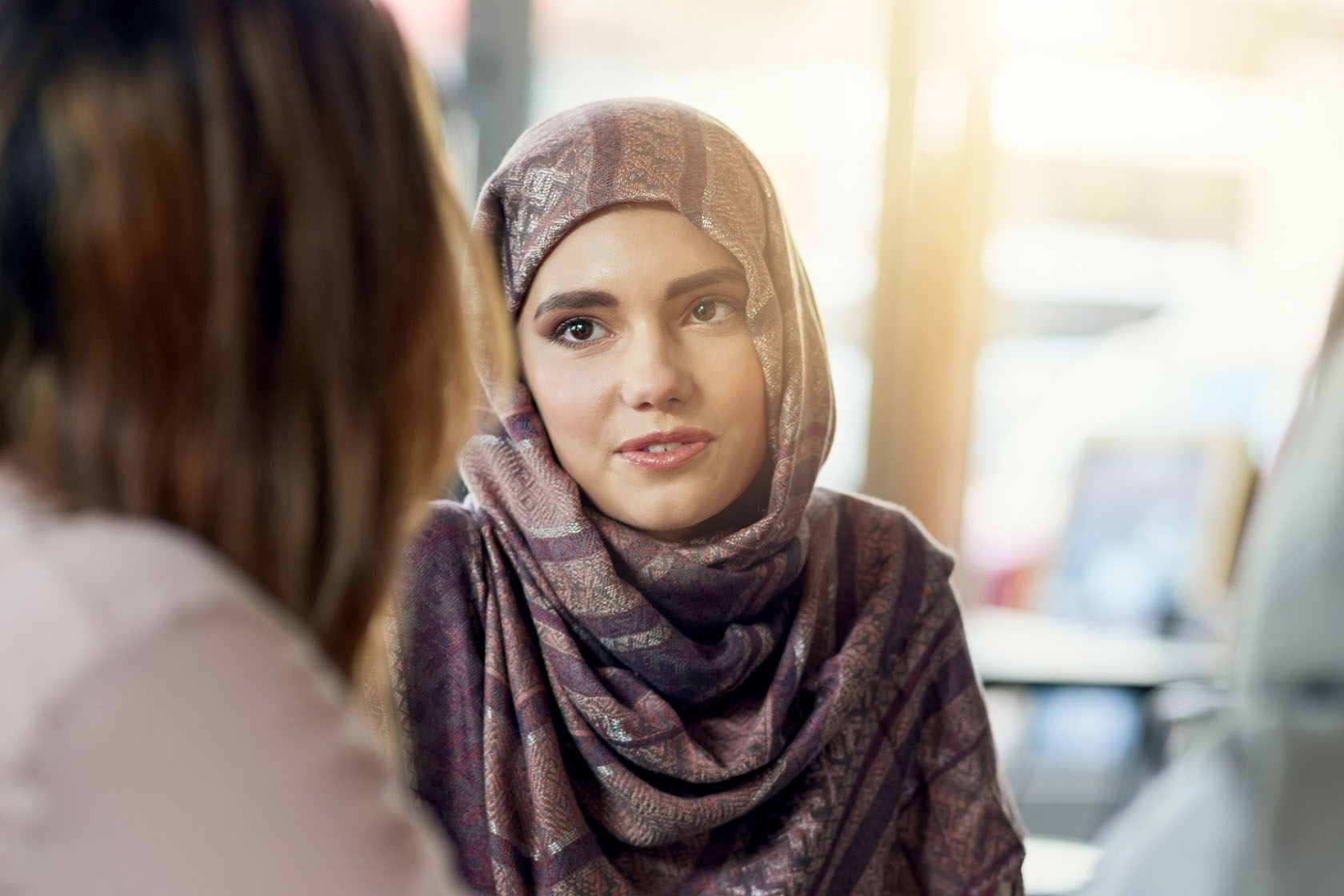
Support Groups are available to offer longer term help to women. Membership of support groups is flexible with some being time limited and others running indefinitely. When you attend a group you will take part in a range of activities to help you understand how you can manage your mental health better. Mental health recovery is a big part of these groups as well as developing peer support networks with other women involved so that you can continue to meet without us.
Current support groups are:
Safer Women
This is a monthly drop in session running between our Centres. Women can access light touch support around domestic abuse. Get in touch for the next date!
Holistic Health
This is a weekly group running at both of our Centres where you can access a range of support covering different themes. We're busy reviewing this group so look out for updates coming soon!
Anxiety, Depression & Low Mood
This is a weekly group to help you manage symptoms of anxiety, depression and low mood.
Mam's Matter
A weekly group for women with young children. You are welcome to bring children (below school age) to this session. There's plenty of toys to play with!
Support & Explore
This group runs each week at both our Centres to help you set goals and explore future opportunities. This group is under review so we'll update soon.
Become a Member
Drop-in Courses
We have a range of workshops and courses to access, these are all aimed at helping you to improve your mental health and wellbeing. If you are interested in attending a course or workshop, please let us know so that we can make sure you are on the waiting list. Once we know the start date for the course, we will invite you to come along. For some courses there is also an enrolment session to help you understand the aim of the course and make sure it is right for you.
Our current workshops and courses are:
HEARTS
A 6 week course (formerly know as Undoing the Damage of Domestic Abuse) to help women who have been impacted by domestic abuse. Emphasis is on making positive changes to rebuild mental health and develop confidence in future healthy relationships.
Routes to Recovery Workshops
We have a range of themed workshops available such as 'Alternative Approaches to Self Care' and 'Writing for Wellbeing'. These activities do not run all of the time so please contact us for up to date schedules and details of how to book your space.
Safety Net
This programme will help women to manage feelings of self harm and suicide in safe spaces.
Grief & Loss
This course will help to understand emptions associated with bereavement.
Mood, Food and Me
A course to help women identify foods which enhance emotional wellbeing.
Positive About Me
A course to increase confidence and improve self-esteem.
Better Out Than In
A course to help women develop assertiveness and communication skills, and manage anger.
Stress Awareness
This programme will help to understand and manage symptoms of stress.
Courses Sign Up
Our current workshops and courses are:
HEARTS
A 6 week course (formerly know as Undoing the Damage of Domestic Abuse) to help women who have been impacted by domestic abuse. Emphasis is on making positive changes to rebuild mental health and develop confidence in future healthy relationships.
Routes to Recovery Workshops
We have a range of themed workshops available such as 'Alternative Approaches to Self Care' and 'Writing for Wellbeing'. These activities do not run all of the time so please contact us for up to date schedules and details of how to book your space.
Safety Net
This programme will help women to manage feelings of self harm and suicide in safe spaces.
Grief & Loss
This course will help to understand emptions associated with bereavement.
Mood, Food and Me
A course to help women identify foods which enhance emotional wellbeing.
Positive About Me
A course to increase confidence and improve self-esteem.
Better Out Than In
A course to help women develop assertiveness and communication skills, and manage anger.
Stress Awareness
This programme will help to understand and manage symptoms of stress.
Courses Sign Up
Room Hire
We have a range of rooms in Gateshead and Newcastle which may be hired out at times when they are not in use. Please contact us for further information and to arrange viewings.
Legacy Donations
Fill in the form below to receive more information about Legacy Donations
Support for Professionals
Partnership Working
Fill in the form below
Regular Donation
Fill in the form below
My Sister's Cuppa
Fill in the form below





New Found is committed to website accessibility for all of our users and we will look to continually improve accessibility on our website.
Accessibility Widget
Accessibility Widget
support
health
hope
happiness
laughter
freedom
friendships
health
hope
happiness
laughter
freedom
friendships
New Found has an Accessibility Widget which enables users to access the site with visual impairments and other sight related issues
Icon launches widget
Simply click on the Accessibility Icon to launch the Accessibility widget. Options Available
Hints and Tips
To increase or decrease the size of the text on the website, it is best to use your keyboard and your browsers built-in accessibility features. In most browsers you can hold CTRL and + (Command and + on a Mac) together to increase the text size. To decrease the size CTRL and - (Command - on a Mac).
Icon launches widget
Simply click on the Accessibility Icon to launch the Accessibility widget. Options Available
- Contrast +
- Highlight Links
- Bigger Text
- Text Spacing
- Pause Animations
- Hide Images
Hints and Tips
To increase or decrease the size of the text on the website, it is best to use your keyboard and your browsers built-in accessibility features. In most browsers you can hold CTRL and + (Command and + on a Mac) together to increase the text size. To decrease the size CTRL and - (Command - on a Mac).
- Dyslexia Friendly
- Cursor
- Tooltips
- Line Height
- Text Align
- Saturation
Accessibility
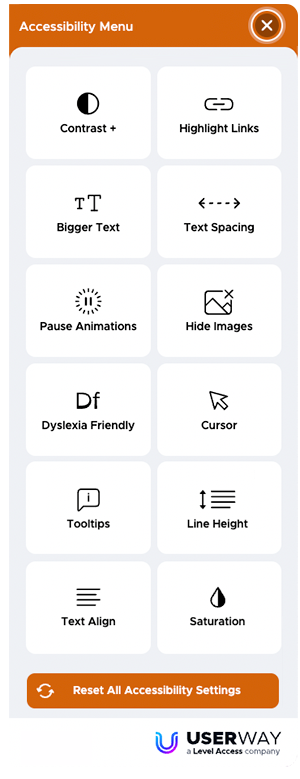

Change the Contrast and colours to help be legible for different types of user
Highlights links to help users see them
Text spacing allows for easier reading
User can change the text size to mmake easier to read
Pause Animations to help with accessibility
Change Cursor Size
Helps people with Dyslexia
Changes text line height
Adds Tooltips to images
Changes colour saturation
Changes the alignment of text
Hide images for users who want text only